


PS: Beware, Don't fall prey to Phishing. Please verify that you are on facebook.com before you enter your password.


I prefer using OpenDNS instead of local ISP DNS servers. OpenDNS is faster, better and totally free. Read the How to switch to OpenDNS in Ubuntu for faster browsing post on OMG Ubuntu to learn more.
OpenDNS is available to use for free and comes with plenty of features that make it a more desirable option over that of your ISP – not least of which is speeding up your browsing!
OpenDNS works anywhere in the world via a global network of servers that ensure all of your DNS requests automatically go to the OpenDNS server that’s physically closest to you.
“The result is an immediately-noticeable faster, more reliable Internet for everyone in your household.”
The service is so good it’s even used by many well-know brands all over the world, with customers ranging from Nvidia & BP to Lush! cosmetics and DC shoes.
Few hours ago I heard that my friend Jawahar Patani finished the documentary about Rural Internet Kiosks(RIK) project. I have been helping this project for while now. I hope that this documentary would spread the word about this wonderful initiative.
Please visit www.ruralinternetkiosks.com to learn more about this project.
This short documentary features ICT development in Africa with emphasis on how the Rural Internet Kiosk (RIK) is changing the way rural Africa communicates. The Rural Internet Kiosk is 100% solar powered and is connected to the Internet via Satellite using Astra2Connect VSAT technology.
You can watch the part 1 and part 2 of this documentary on youtube.
The book How to Bypass Internet Censorship using free software tools is now out. The book is distributed on Lulu.com. The interesting aspect about this book is that it is created using collaborative content development system over a period of (just) five days by various contributors.
In the past I had blogged about how to bypass the filtering systems using translation services like Babelfish, however I think the book would be more informative for all.
Because of concerns about the effect of Internet blocking mechanisms, and the implications of censorship, many individuals and groups are working hard to ensure that the Internet, and the information on it, are freely available to everyone who wants it.
This book documents simple circumvention techniques such as a cached file or web proxy, and also describes more complex methods using Tor, which stands for The Onion Router, involving a sophisticated network of proxy servers.
FLOSS Manuals publications will always be available for free in HTML and PDF from the FLOSS Manuals Website. Each book sale generates $2.50 (USD). 100% of this income goes back into the development of more manuals about free software.
You can also order a dead tree version of this book or just download it.
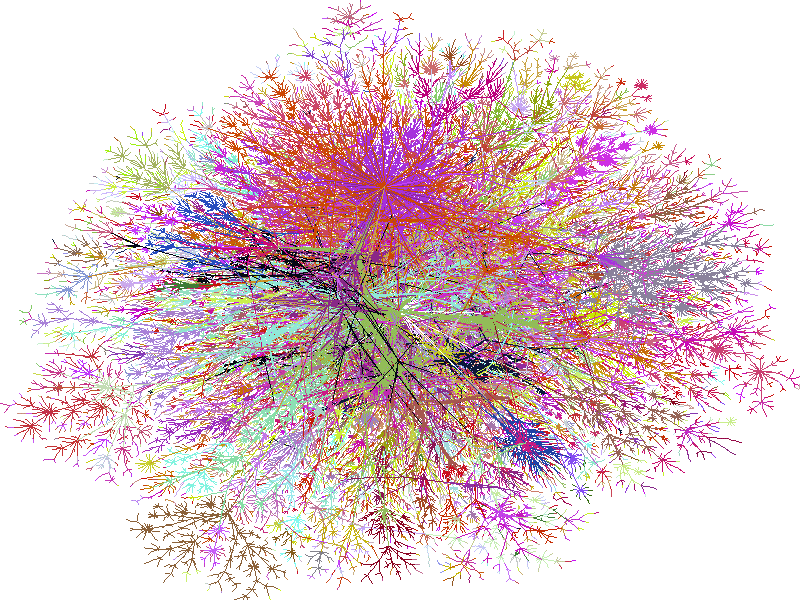
I watched the map of internet mentioned in the recent "Download: The True Story of the Internet " on Discovery Channel, it sounds like a great idea for a Information visualization project. Here is an old map that was published in December 1998 issue of Wired Magazine, Cool!.
The data is available and more information can be found on the Internet Mapping Project page.
The ground floor of our campus library is lined with public access computers, anyone can surf the Internet, search library database and access the scholarly journals in digital form. These machines run one version of Microsoft Windows operating system or other, anti-virus and security updates are non-existent. The only kind of maintenance these machines see is when they crash and someone runs a re-install with a Windows boot CD.
It doesn't take much to migrate some of these machines to gnu/Linux (if you can cut the red tap) and provide a secure and safe browsing experience to the users. There are quite some documentation that help you turn a KDE desktop or the popular Ubuntu Linux to work as a public access kiosk machine. Its relatively easy to setup and makes economic sense too.
However there are still some (technical) problems that need to be addressed, the needs of the kiosk mode desktop environment are quite different. Instant messenger clients running on a Internet kiosk need interface that enable users to log on without storing the user name, password to a user account on the computer. I haven't yet come across any exist free software IM clients that have this kind of facility. You can use the web based IM clients but they aren't a very good alternative.
Pidgin (formerly gaim) is the most popular instant messenger client that comes with most gnu/Linux distributions, it can connect to multiple IM protocols including AIM, MSN, Yahoo!, XMPP, ICQ, IRC, SILC, SIP/SIMPLE, Novell GroupWise, Lotus Sametime, Bonjour, Zephyr, MySpaceIM, Gadu-Gadu, QQ ,Google's Gtalk and more. However pidgin logon interface to aimed users with personal accounts. Perhaps this is one of the issues that free software IM developer should remedy in near future.